When you open your FileMaker solution, you may expect it to display the correct company logo, use your company’s time zone, or open a window at a familiar size.
Those settings do not appear by accident. Your developer must give the solution a way to retain the information and retrieve it when it is needed.
FileMaker 2026 provides a new option for doing this with the persistent data store.
Settings and preferences your solution may need
Most of the information in your FileMaker solution represents the work your organization performs. This may include customers, projects, invoices, appointments, inventory, or service history.
However, your solution may also need instructions about how it should look or behave. Examples include:
- Which screen should appear when someone opens the solution?
- Should a window always open at a particular size or position?
- Which language, currency, or time zone should the solution use?
- Which company logo and business hours should appear on documents?
- Can an individual user choose a preferred theme or default view?
Some of these settings may apply to everyone in the company. Others may reflect the preferences of an individual user.
These details are often called application settings or user preferences. While they are not your typical data, the solution still needs a way to retain them and retrieve them when they are needed.
How does the persistent data store help?
As of FileMaker 2026, Claris offers a new storage area called the persistent data store.
Think of the persistent data store as an internal storage area within a FileMaker file and the information saved inside it is persistent data.
“Persistent” means the information remains available after you close and reopen FileMaker. Your developer can save a setting in the file and retrieve it again during a future session.
The persistent data store does not automatically watch what you do or remember your preferences. Your developer must decide what information to store and build the scripts that save and retrieve it.
All users of the FileMaker file share the same persistent data store. If it is used for individual preferences, your developer must also create a way to identify which settings belong to each user.
Before FileMaker 2026, a developer might create additional tables and fields solely to hold this type of data or settings. Those methods are still available, but the persistent data store simply gives developers another option.
What might this look like in your solution?
Suppose you prefer to begin on a particular screen and use a specific window size. Your developer could add options that let you choose those preferences.
When you save your choices, a script could store them as persistent data. The next time you open the file, another script could retrieve the settings and apply them. A different user could have different preferences if the developer builds the solution to identify each person’s settings.
The persistent data store provides the place to keep the information. The developer creates the experience you see.
A company-preferences example
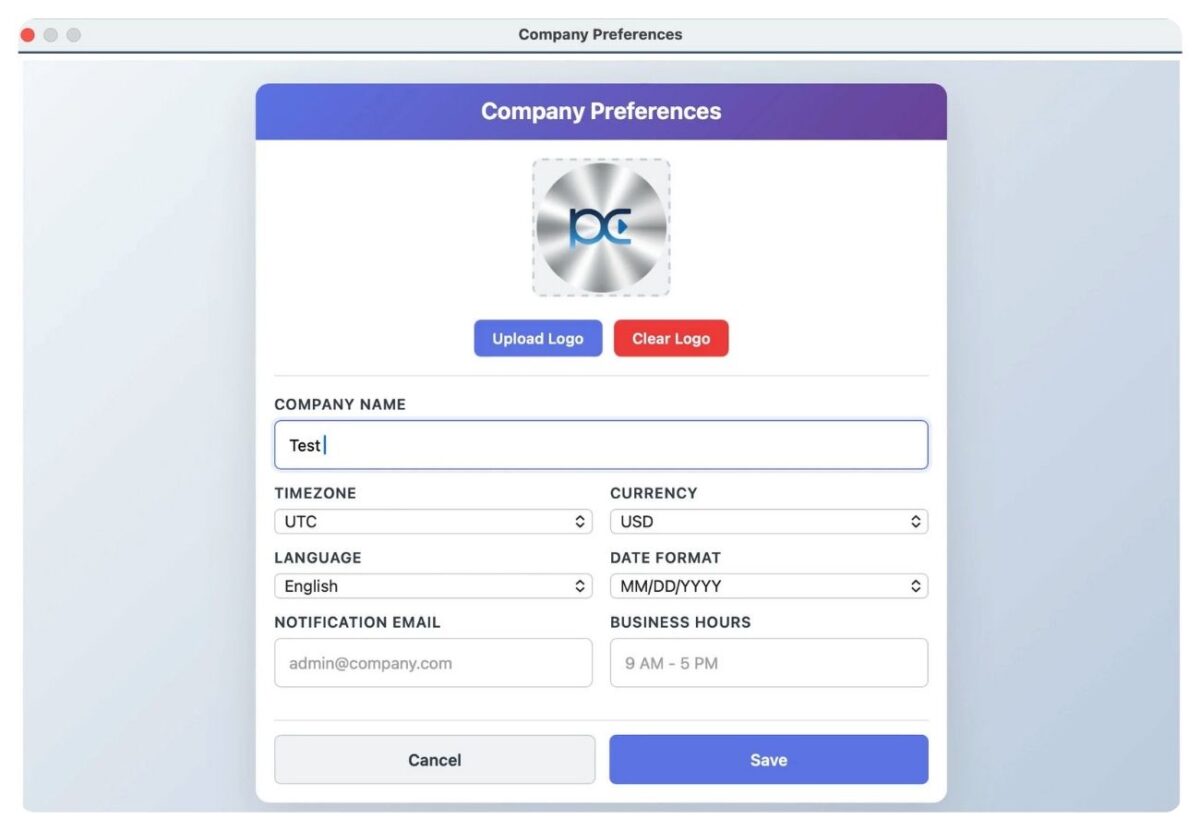
Our Company Preferences demo applies the same idea to settings used throughout a business.
The demo includes a form where you can enter:
- Your company name and logo
- Your time zone
- Your language and currency
- Your business hours
When you click Save, the solution stores the preferences as persistent data. FileMaker can then display the information on a layout or use it in a script whenever it is needed.
If a setting changes, you can return to the form, update the information, and save the new preferences. The example does not require a traditional preferences table, related fields, or relationships.
Developers can also use the persistent data store for information that works behind the scenes, such as file version details or resources used by scripts and Web Viewers.
What should remain a regular FileMaker record?
The persistent data store is not intended to replace your day-to-day business data, such as customers, vendors, invoices, projects, or inventory. This information should remain as records in traditional FileMaker tables.
Your developer should consider how the information will be used before deciding where it belongs.
Continue learning about persistent data
Whether you are new to the persistent data store or ready to explore specific implementations, these resources can help you take the next step.
1. Start with the Claris webinar. For an introduction to the persistent data store and examples of how it can be used, watch the Claris Community Live webinar.
2. Learn the basics and explore the demo. A new section in our Claris FileMaker Pro Advanced 1 course teaches you the basics of working with persistent data.
The persistent data (company prefs) lesson demonstrates how to store and retrieve company preferences without creating a traditional preferences table, related fields, or relationships. This lesson is available for free and includes the company-preferences demo file featured in the Claris webinar.
3. Explore server-side scripting. When you are ready to go further, a new lesson in Claris FileMaker Pro Advanced 2 demonstrates how to use persistent data with server-side scripting.
Frequently Asked Questions
Does the persistent data store replace settings tables or global fields?
The persistent data store provides another option for information that needs to remain available across sessions but does not need to behave like traditional record data. A settings table may still be a better choice when users need to view, edit, search, report on, or relate the information to other records.
Can the persistent data store retain information for individual users?
Yes, but all users of a FileMaker file share the same persistent data store. You must build the logic that associates each persistent data entry with the correct user and retrieves it when needed. The persistent data store provides the storage location, but it does not automatically personalize the solution or make an entry private to an individual user.
What should you consider before using the persistent data store?
You need to think about how entries and instance IDs will be named, whether the persistent data applies to the company, application, or an individual user, and who should be able to read or change it. Persistent data store entries are included when a FileMaker file is cloned, but they are not copied to the destination file by the FileMaker data migration tool. You should account for this behavior during deployment and carefully evaluate whether the persistent data store is appropriate for sensitive information.
Other products and services Productive Computing, Inc. offers:
- What can PCI do for you? – overview of our services
- Health Assessment – a comprehensive report of your FileMaker system
- Consulting and Development – services billed by the hour
- Maintenance and Support – services billed monthly
- Packaged Services – Security Audit, SSL or Server Installation
- Plug-ins – tools to integrate with QuickBooks, Outlook, Google, and more
- Solutions – free customizable and scalable CRM template
- Claris and FileMaker Licensing – discounts on new seats and renewals
- FileMaker and QuickBooks Hosting – host your files in the cloud
- Productive Computing University – online beginner to advanced training courses
- Certification Programs – expert-led training, hands-on development, and personalized evaluations