Searching in FileMaker has traditionally required users to understand field names, layouts, and how to build multi-step find requests. For smaller teams and non-technical users, that learning curve can slow things down and lead to frustration.
Natural language finds change that experience. Instead of constructing complex criteria, users can simply type what they are looking for in everyday language. FileMaker then uses AI to interpret the request, build the appropriate find criteria, and return the results automatically. The outcome is faster searching, fewer mistakes, and a more comfortable experience for everyday users.
This approach is especially useful in CRM, operations, and service-based solutions where teams frequently search across many fields and related records.
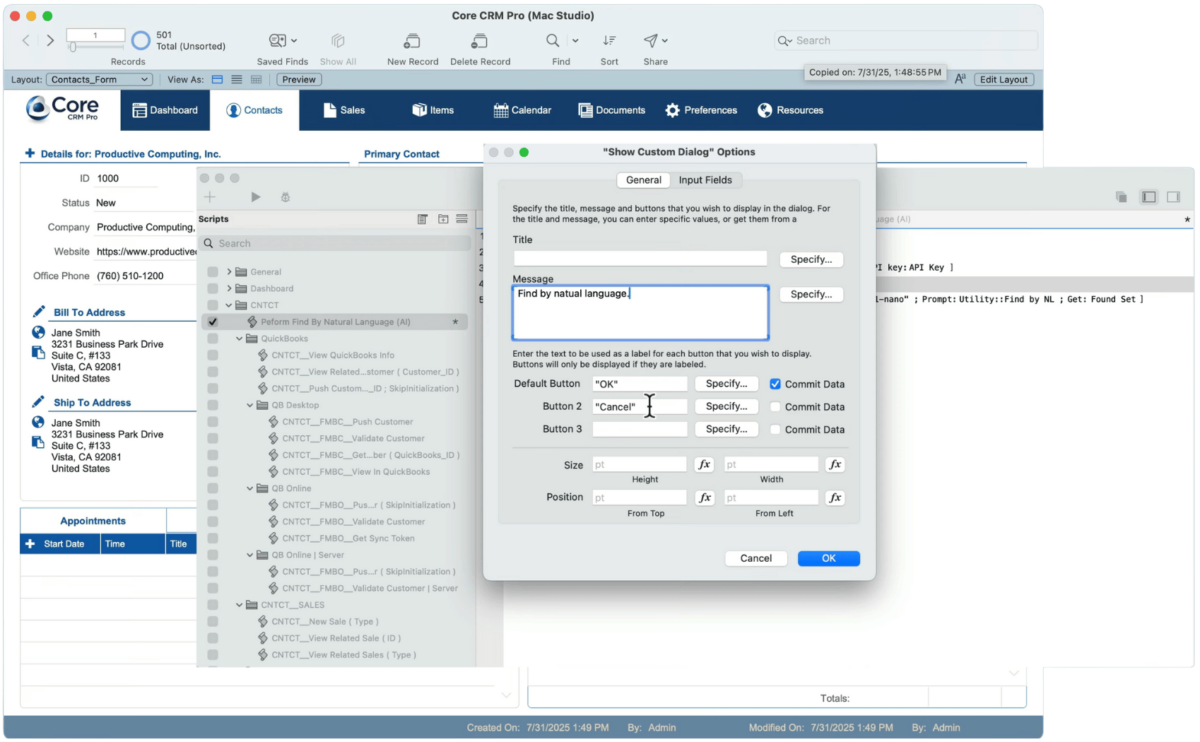
Learn more about how to make “finds” easier with the FileMaker script step Perform Find by Natural Language in this video. This free excerpt is part of a paid course, AI Essentials for FileMaker Developers, offered by Productive Computing University.
How Perform Find by Natural Language Works
The user enters a simple text request, such as finding companies in a specific state or locating contacts with invoices above a certain amount. That request is sent to an AI model, which interprets the intent and translates it into structured FileMaker find criteria. FileMaker then executes the find using its standard search engine.
The request is evaluated in the context of the current layout, available fields, related tables, and even field comments. This helps the system determine which fields should be used to build the search.
From Simple Finds to More Advanced Questions
Perform Find by Natural Language works well for basic searches such as locating a person by name or filtering records by location. It also supports numeric comparisons, related data, and multiple conditions within a single request.
With additional prompting and more capable models, it can even interpret real-world logic, such as geographic relationships or business rules that would normally require multiple manual steps. This opens the door to searches that many users would never attempt on their own.
Why Field Names and Schema Design Matter
The accuracy of natural language finds depends heavily on how your FileMaker database is designed. Clear field names and helpful field comments give AI better context and improve the quality of the results.
Well-organized schemas with logical relationships also make it easier for the system to interpret user intent, especially in solutions with many related records and portals.
Practical Business Use Cases
Natural language finds are well suited for many everyday business scenarios, including:
- CRM users searching for contacts without knowing the database structure
- Sales teams locating high-value opportunities based on amounts or status
- Operations staff filtering records across multiple related tables
- Support teams isolating records by activity or service date
- Managers reviewing trends using plain-language search phrases
Try It Yourself
Follow along with the steps in the video or sign up for the paid course, AI Essentials for FileMaker Developers, to use the demo file and learn more about using AI with FileMaker. To add this feature in your own solution, you will need FileMaker 2025 or later, an active AI account and API key.
FAQ for Developers
Does this replace traditional FileMaker finds?
No. It adds a simpler option for users while traditional find tools remain fully available for advanced workflows.
Can users enter very open-ended requests?
They can, but better results come from clear, well-structured language. Some guidance or user training is often helpful.
Does this work with large datasets?
Yes. The system still uses standard FileMaker finds, so performance depends on indexing and database design.
Is this feature suitable for production systems?
Yes, when properly tested, but usage costs, model selection, and prompt design should be reviewed before deployment.
What makes a natural language find more accurate?
Clear field names, helpful field comments, and well-designed relationships significantly improve interpretation and results.
Natural language finds represent a major shift in how users interact with FileMaker data. By combining structured records with flexible AI interpretation, you can deliver a search experience that feels intuitive while remaining precise and reliable.
Other products and services Productive Computing, Inc. offers:
- What can PCI do for you? – overview of our services
- Health Assessment – a comprehensive report of your FileMaker system
- Consulting and Development – services billed by the hour
- Maintenance and Support – services billed monthly
- Packaged Services – Security Audit, SSL or Server Installation
- Plug-ins – tools to integrate with QuickBooks, Outlook, Google, and more
- Solutions – free customizable and scalable CRM template
- Claris and FileMaker Licensing – discounts on new seats and renewals
- FileMaker and QuickBooks Hosting – host your files in the cloud
- Productive Computing University – online beginner to advanced training courses
- Certification Programs – expert-led training, hands-on development, and personalized evaluations