

File Manipulator Plug-in for FileMaker
The File Manipulator plug-in is a perfect utility plug-in for FileMaker Pro.
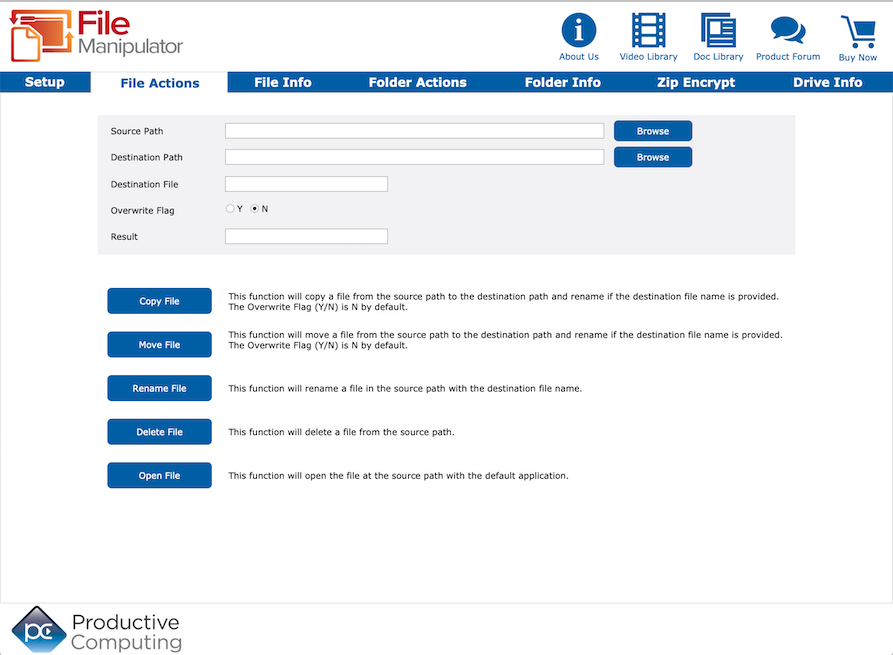

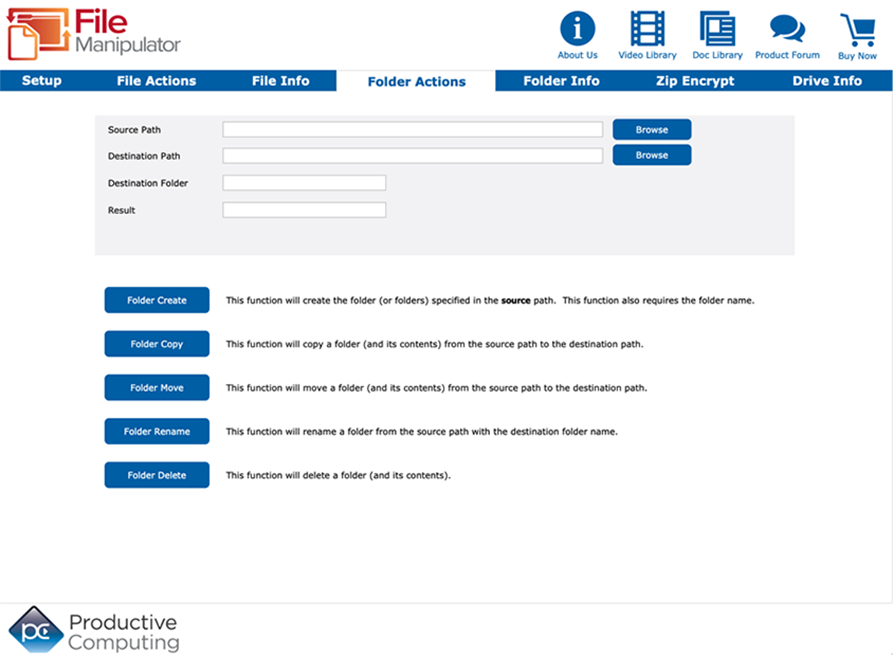
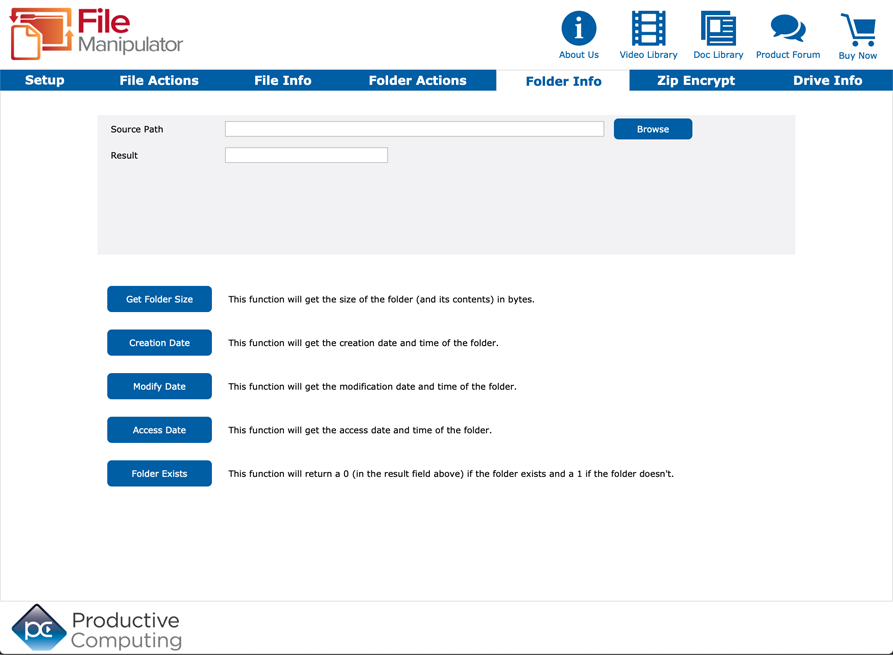
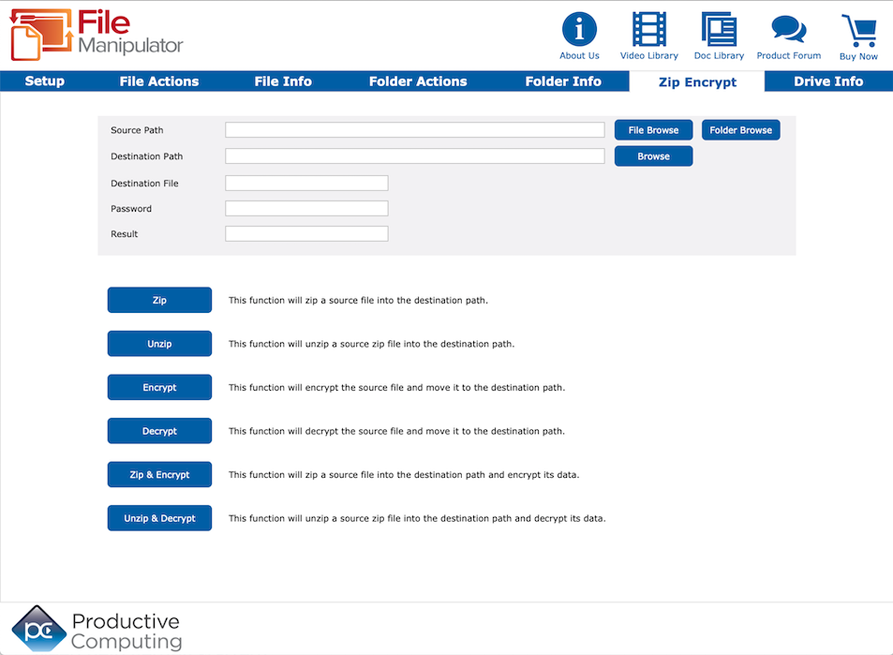
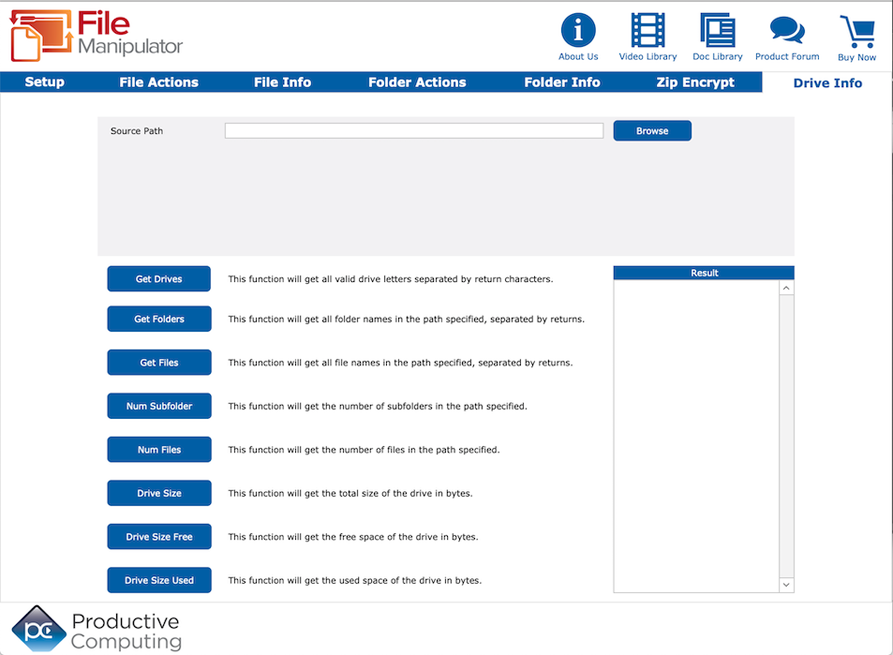

File Manipulator
Win Version 5.0.1.4
Mac Version 5.0.2.2
Platform
Windows | Mac
Pricing Options
Please select your desired license option:
The File Manipulator plug-in gives users the ability to copy, move, rename or delete files and folders directly from a FileMaker solution, as well as conveniently compress and encrypt file data with password protection.
Key Features
Download our Plug-in Demo
Try our fully functional demo file for up to 30 days. Please note the demo will expire 2 hours from opening your FileMaker application. To reset the demo, close and reopen your FileMaker application.
Need help getting started?
Visit our Help Center for a full list of FAQs and product documentation, submit a question on our PCI FM Forums page, or view videos on our YouTube channel.
System Requirements
Application:
FileMaker Pro 2025 - 2026 for Windows
FileMaker Pro 2025 - 2026 for Mac
Platform:
Windows® 10/11 Enterprise and Pro Editions (64-bit only)
macOS 15 - 27
Mac version: Apple Silicon and Intel chipset compatible.
The plug-in may work with earlier versions of FileMaker or operating systems, however, these are no longer supported.
As of FileMaker 19, all plug-ins need to be 64-bit. If using older plug-ins or older versions of FileMaker, the plug-in bit version that you use depends upon the FileMaker Pro bit version you have installed. FileMaker and the plug-in need to be running in the same bit version.
Version History
- Version: 5.0.2.2 | Release Date: 09/14/2026 | Platform: Mac
- This plug-in is verified as compatible with macOS 15 - 27
- Version: 5.0.2.2 | Release Date: 06/09/2026 | Platform: Mac
- This plug-in is verified as compatible with FileMaker Pro 2026
- Version: 5.0.1.4 | Release Date: 06/09/2026 | Platform: Win
- This plug-in is verified as compatible with FileMaker Pro 2026
- Version: 5.0.2.2 | Release Date: 11/17/2025 | Platform: Mac
- This plug-in is verified as compatible with macOS 14 - 26
- Version: 5.0.2.2 | Release Date: 07/08/2025 | Platform: Mac
- This plug-in is verified as compatible with FileMaker Pro 2025
- Version: 5.0.1.4 | Release Date: 07/08/2025 | Platform: Win
- This plug-in is verified as compatible with FileMaker Pro 2025
- Version: 5.0.2.2 | Release Date: 09/26/2024 | Platform: Mac
- The plug-in is verified as compatible with macOS 13 - 15
- Version: 5.0.2.2 | Release Date: 09/03/2024 | Platform: Mac
- Updated to use the latest version of FileMaker 2024 plug-in SDK
- Updated demo file
- Updated handling for secure access to the Productive Computing plug-in registration server
- Version: 5.0.1.4 | Release Date: 08/23/2024 | Platform: Win
- Updated the code signing certificate for the Windows installer to ensure plug-in security
- Updated to use the latest version of FileMaker 2024 plug-in SDK
- Updated demo file
- Updated handling for secure access to the Productive Computing plug-in registration server
- Version: 5.0.2.1 | Release Date: 06/04/2024 | Platform: Mac
- This plug-in is verified as compatible with FileMaker Pro 2024
- Version: 5.0.1.3 | Release Date: 06/04/2024 | Platform: Win
- This plug-in is verified as compatible with FileMaker Pro 2024
- Version: 5.0.2.1 | Release Date: 10/05/2023 | Platform: Mac
- This plug-in has been updated for compatibility with macOS 10.15 - 14
- Updated digital signature and security settings to adhere to Apple Gatekeeper requirements
- Version: 5.0.2.1 | Release Date: 04/25/2023 | Platform: Mac
- This plug-in is verified compatible with FileMaker Pro 2023
- Version: 5.0.1.3 | Release Date: 04/25/2023 | Platform: Win
- This plug-in is verified compatible with FileMaker Pro 2023
- Version: 5.0.2.1 | Release Date: 10/25/2022 | Platform: Mac
- This plug-in is verified compatible with macOS 10.15 - 13
- Version: 5.0.1.3 | Release Date: 09/27/2022 | Platform: Win
- This plug-in is verified compatible with Claris Pro
- Version: 5.0.2.1 | Release Date: 09/27/2022 | Platform: Mac
- This plug-in is verified compatible with Claris Pro
- Minor updates to the zip and encrypt functions
- Version: 5.0.1.3 | Release Date: 11/18/2021 | Platform: Win
- This plug-in is verified compatible with Windows 11.
- Version: 5.0.2.0 | Release Date: 10/28/2021 | Platform: Mac
- This plug-in is verified compatible with macOS 10.15 - 12
- Version: 5.0.1.3 | Release Date: 09/21/2021 | Platform: Win
- Updated the code signing certificate for the Windows installer to ensure plug-in security.
- Version: 5.0.2.0 | Release Date: 08/03/2021 | Platform: Mac
- Added support for Apple Silicon (M1 / ARM64) system architecture.
- Version: 5.0.1.2 | Release Date: 05/17/2021 | Platform: Mac
- Updated the code signing certificate for the Mac installer for compatibility with the Mac security layer.
- Version: 5.0.1.2 | Release Date: 11/12/2020 | Platform: Mac
- This plug-in is verified compatible with macOS 10.14 - 11
- Version: 5.0.1.2 | Release Date: 5/20/2020 | Platform: Win
- This plug-in is verified compatible with FileMaker Pro 19 (64-bit) and FileMaker Pro (Advanced) 17 - 18 (32-bit & 64-bit)
- Miscellaneous improvements
- Updated Demo file
- Version: 5.0.1.2 | Release Date: 5/20/2020 | Platform: Mac
- This plug-in is verified compatible with FileMaker Pro (Advanced) 17 - 19
- Miscellaneous improvements
- Updated Demo file
- Version: 5.0.1.1| Release Date: 10/7/2019 | Platform: Mac
-
This plug-in is verified compatible with macOS 10.13 - 10.15
-
- Version: 5.0.1.1| Release Date: 05/22/2019 | Platform: Win
- This plug-in is verified compatible with FileMaker Pro (Advanced) 16 - 18 (32-bit & 64-bit)
- This plug-in and its installer is now code-signed, introducing an extra level of security that ensures the plug-in package is not compromised in any way
- Version: 5.0.1.1| Release Date: 05/22/2019 | Platform: Mac
- This plug-in is verified compatible with FileMaker Pro (Advanced) 16 - 18
- This plug-in and its installer is now code-signed, introducing an extra level of security that ensures the plug-in package is not compromised in any way
- Version: 5.0.1.0 | Release Date: 01/28/2019 | Platform: Mac
- This plug-in and its installer is now code-signed, introducing an extra level of security that ensures the plug-in package is not compromised in any way.
- Added new function "PCFM_FileOpen( FilePath )" to both Win and Mac, allowing the plug-in to open the file at the specified path using the default application associated with the file.
- Updated functionality of PCFM_ExpandFile to support a missing destination path. If the destination path is not provided, the zip file in the source path will be extracted to the same folder it resides in.
- Version: 5.0.1.0 | Release Date: 01/28/2019 | Platform: Win
- This plug-in and its installer is now code-signed, introducing an extra level of security that ensures the plug-in package is not compromised in any way.
- Added new function "PCFM_FileOpen( FilePath )" to both Win and Mac, allowing the plug-in to open the file at the specified path using the default application associated with the file.
- Updated functionality of PCFM_ExpandFile to support a missing destination path. If the destination path is not provided, the zip file in the source path will be extracted to the same folder it resides in.
- Version: 5.0.0.1 | Release Date: 09/20/2018 | Platform: Mac
- This plug-in is verified compatible with Mac OS 10.12 - 10.14
- Miscellaneous bug fixes
- Version: 5.0.0.0 | Release Date: 07/03/2018 | Platform: Win
- Resolved an issue in File Manipulator for Windows where file and folder data functions (such as PCFM_GetFileCreationDate and PCFM_GetFolderSize) fail to locate the file or folder properly when using a non-network path.
- Updated demo file
- Version: 5.0.0.0 | Release Date: 07/03/2018 | Platform: Mac
- Updated demo file
- Updated demo file
- Releases prior to v5.0.0.0 are considered legacy versions and are no longer supported.
- Version: 4.0.1.2 | Release Date: 07/03/2018 | Platform: Win
- Resolved an issue in File Manipulator for Windows where file and folder data functions (such as PCFM_GetFileCreationDate and PCFM_GetFolderSize) fail to locate the file or folder properly when using a non-network path
- Download v 4.0.1.2
- Version: 4.0.2.2 | Release Date: 07/03/2018 | Platform: Mac
- Updated Reg code
- Download v 4.0.2.2
- Version: 4.0.1.1 | Release Date: 05/15/2018 | Platform: Win
- This plug-in is confirmed compatible with FileMaker Pro 15 - 17 (32-bit and 64-bit)
- Version: 4.0.2.1 | Release Date: 05/15/2018 | Platform: Mac
- This plug-in is confirmed compatible with FileMaker Pro 15 - 17 (64-bit)
- This plug-in is confirmed compatible with FileMaker Pro 15 - 17 (64-bit)
- Version: 4.0.2.1 | Release Date: 09/25/2017 | Platform: Mac
- Adjusted Mac registration product code to be identical to the Windows version
- Version: 4.0.2.1 | Release Date: 09/25/2017 | Platform: Mac
- This plug-in is verified compatible with Mac OS 10.11- 10.13
- Updated demo file
- This plug-in is verified compatible with Mac OS 10.11- 10.13
- Version: 4.0.1.1 | Release Date: 08/09/2017 | Platform: Win
- Updated handling of network file paths in PCFM_GetFileExists, PCFM_GetFolderExists, file and folder functions
- Updated handling of network file paths in PCFM_GetFileExists, PCFM_GetFolderExists, file and folder functions
- Version: 4.0.2.0 | Release Date: 05/09/2017 | Platform: Mac
- This plug-in is now confirmed compatible with FileMaker 14 (32-bit and 64-bit) and FileMaker 15-16 (64-bit)
- Added FileMaker 16 script step functionality
- Updated Developer's Guide
- This plug-in is now confirmed compatible with FileMaker 14 (32-bit and 64-bit) and FileMaker 15-16 (64-bit)
- Version: 4.0.1.0 | Release Date: 05/09/2017 | Platform: Win
- This plug-in is now confirmed compatible with FileMaker 14 - 16 (32-bit and 64-bit)
- Added FileMaker 16 script step functionality
- Updated Developer's Guide
- This plug-in is now confirmed compatible with FileMaker 14 - 16 (32-bit and 64-bit)
- Version: 4.0.1.0 | Release Date: 10/13/2016 | Platform: Mac
- Verified compatible with Mac OS 10.10 - 10.12
- Resolved bad encoding in error messages
- Resolved an issue when copying and moving files to the same source location
- Resolved an issue with the file paths including the string "err"
- Resolved a path issue when using 'FolderCreate' function
- Updated uninstallation process to adhere to Apple security in MacOS Sierra
- Verified compatible with Mac OS 10.10 - 10.12
- Version: 4.0.0.1 | Release Date: 07/06/2016 | Platform: Mac
- Resolved an issue with the rebuild of the plug-in that would cause preexisting FileMaker scripting to throw "Source Path not Found" for external drives or partitions that did not contain "/Volumes/" as the root of the path
- Resolved an issue with the rebuild of the plug-in that would cause preexisting FileMaker scripting to throw "Source Path not Found" for external drives or partitions that did not contain "/Volumes/" as the root of the path
- Version: 4.0.0.0 | Release Date: 06/30/2016 | Platform: Win
- This plug-in is confirmed compatible with FileMaker Pro 15, 32-bit and 64-bit
- Added functionality "PCFM_GetDriveSizeFree( Path )". The plug-in is now able to return the free space of the specified drive in bytes
- Added functionality "PCFM_GetDriveSizeUsed( Path )" The plug-in is now able to return the used space of the specified drive in bytes
- Created MSI installer packages for installing the Windows plug-in
- Implemented updated internal folder handling for all Folder functions based on recommended Windows practices
- esolved an issue with FileCopy that was creating a series of "junk" characters when overwriting a large-sized file over a network connection
- Miscellaneous demo enhancements and updates
- Updated the "PCFM_CompressFile( Source ; Destination )" function to zip the contents of a folder if provided a folder path. The resulting zip file will contain all files, folders, and subfolders within the source path, maintaining the file system hierarchy within the zip file
- Updated Windows plug-in to work with Visual Studio 2013
- Updated the "PCFM_ExpandFile( Source ; Destination )" function to ensure that it will properly expand the contents of a zipped folder created by "PCFM_CompressFile" and maintain file system hierarchy from the zip file
- Updated the source code of the Windows plug-ins to utilize newer programming technologies available
- Updated Developer's Guide
- Updated Function's Guide
- This plug-in is confirmed compatible with FileMaker Pro 15, 32-bit and 64-bit
- Version: 4.0.0.0 | Release Date: 06/30/2016 | Platform: Mac
- This plug-in is confirmed compatible with Mac OS X 10.11 El Capitan
- This plug-in is confirmed compatible with FileMaker Pro 15, 64-bit
- Added functionality "PCFM_GetDriveSizeFree( Path )". The plug-in is now able to return the free space of the specified drive in bytes
- Added functionality "PCFM_GetDriveSizeUsed( Path )" The plug-in is now able to return the used space of the specified drive in bytes
- Created DMG installer package for installing the Mac plug-in
- Resolved an issue with FileCopy that was creating a series of "junk" characters when overwriting a large-sized file over a network connection
- Miscellaneous demo enhancements and updates
- Updated the "PCFM_CompressFile( Source ; Destination )" function to zip the contents of a folder if provided a folder path. The resulting zip file will contain all files, folders, and subfolders within the source path, maintaining the file system hierarchy within the zip file
- Updated the "PCFM_ExpandFile( Source ; Destination )" function to ensure that it will properly expand the contents of a zipped folder created by "PCFM_CompressFile" and maintain file system hierarchy from the zip file
- Updated the source code of the Mac plug-ins to utilize newer programming technologies available
- Updated Developer's Guide
- Updated Function's Guide
- Download version 3 for Mac
- This plug-in is confirmed compatible with Mac OS X 10.11 El Capitan
- Version: 3.0.1.0 | Release Date: 05/10/2016 | Platform: Win
- This plug-in is confirmed compatible with FileMaker® Pro 13 - 15 for Windows, 32-bit
- Confirmed compatibility with Windows 10
- Download version 3 for Windows
- This plug-in is confirmed compatible with FileMaker® Pro 13 - 15 for Windows, 32-bit
- Version: 3.0.0.1 | Release Date: 01/19/2016 | Platform: Mac
- This plug-in is verified compatible with Mac OS X 10.9 - 10.10
- This plug-in is verified compatible with Mac OS X 10.9 - 10.10
- Version: 3.0.1.0 | Release Date: 05/28/2015 | Platform: Win- FileMaker 14 32-bit compatible
- This plug-in is verified compatible with FileMaker® Pro 12-14 and Windows® 7/8 and may work with earlier versions.
- This plug-in is verified compatible with FileMaker® Pro 12-14 and Windows® 7/8 and may work with earlier versions.
- Version: 3.0.0.1 | Release Date: 05/28/2015 | Platform: Mac- FileMaker 14 32-bit compatible
- This plug-in is verified compatible with FileMaker® Pro 12-14, Macintosh 10.7-10.10 and may work with earlier versions.
- Version: 3.0.0.1 | Release Date: 10/20/2014 | Platform: Mac
- Mac Yosemite OS X 10.10 certified
- Mac Yosemite OS X 10.10 certified
- Version: 3.0.1.0 | Release Date: 12/30/2013 | Platform: Win
- Added support for FileMaker Pro 13
- Miscellaneous minor updates to demo file
- Added support for FileMaker Pro 13
- Version: 3.0.0.1 | Release Date: 09/23/2013 | Platform: Mac
- Internal code updated to use FileMaker 12 SDK
- Fixed a bug involving unzipping files
- Miscellaneous minor updates to demo file
- Internal code updated to use FileMaker 12 SDK
- Version: 3.0.0.1 | Release Date: 09/19/2013 | Platform: Win
- Internal code updated to use FileMaker 12 SDK
- Updated Developer's Guide
- Internal code updated to use FileMaker 12 SDK
- Version: 3.0.0.0 | Release Date: 07/23/2013 | Platform: Win
- Added new functions to implement Zip/Encrypt/Unzip/Decrypt:
1) PCFM_CompressAndEncrypt( Source ; Destination ; Password )
2) PCFM_CompressFile( Source ; Destination )
3) PCFM_DecryptAndExpand( Source ; Destination ; Password )
4) PCFM_DecryptFile( Source ; Desination ; Password )
5) PCFM_EncryptFile( Source ; Destination ; Password )
6) PCFM_ExpandFile( Source ; Destination ) - Modified plug-in name consistency between Windows/Mac.
- Implemented GetLastError functionality.
- Updated Developer's Guide.
- Updated Functions Guide.
- Added new functions to implement Zip/Encrypt/Unzip/Decrypt:
- Version: 3.0.0.0 | Release Date: 07/23/2013 | Platform: Mac
- Added new functions to implement Zip/Encrypt/Unzip/Decrypt:
1) PCFM_CompressAndEncrypt( Source ; Destination ; Password )
2) PCFM_CompressFile( Source ; Destination )
3) PCFM_DecryptAndExpand( Source ; Destination ; Password )
4) PCFM_DecryptFile( Source ; Desination ; Password )
5) PCFM_EncryptFile( Source ; Destination ; Password )
6) PCFM_ExpandFile( Source ; Destination ) - Modified plug-in name consistency between Windows/Mac.
- Implemented GetLastError functionality.
- Updated Developer's Guide.
- Updated Functions Guide.
- Added new functions to implement Zip/Encrypt/Unzip/Decrypt:
- Version: 2.0.4.3 | Release Date: 12/05/2012 | Platform: Win
- Registration System 2 Plug-in release
- Updated demo lockout from 30 minutes to 2 hours
- Updated Registration URL to "licensing2.productivecomputing.com"
- Updated Developer's Guide
- Updated Functions Guide
- Registration System 2 Plug-in release
- Version: 2.0.4.0 | Release Date: 12/05/2012 | Platform: Mac
- Registration System 2 Plug-in release
- Updated demo lockout from 30 minutes to 2 hours
- Updated Registration URL to "licensing2.productivecomputing.com"
- Updated Developer's Guide
- Updated Functions Guide
- Added support for OS X 10.8 Mountain Lion
- Registration System 2 Plug-in release
- Version: 2.0.3.0 | Release Date: 07/28/2011 | Platform: Mac
- Added support for OS X 10.7 Lion
- Lion compatibility removed support for 10.4 Tiger and 10.5 Leopard (special builds available for 10.4 or 10.5 by request)
- Added support for OS X 10.7 Lion
- Version: 2.0.3.2 | Release Date: 11/17/2009 | Platform: Win
- Added ability to use a path with a trailing "" character as a folder path in functions that require a folder path
- Added new logo to splash screen
- Added ability to use a path with a trailing "" character as a folder path in functions that require a folder path
- Version: 2.0.2.5 | Release Date: 11/04/2009 | Platform: Mac
- Fixed PCFM_GetOperatingMode to return EXPIRED
- Added new logo to splash screen
- Fixed PCFM_GetOperatingMode to return EXPIRED
- Version: 2.0.3.1 | Release Date: 08/21/2009 | Platform: Win
- Corrected registration issue where the plug-in was expiring in 30 days for all users
- Corrected registration issue where the plug-in was expiring in 30 days for all users
- Version: 2.0.3.0 | Release Date: 01/29/2009 | Platform: Win
- Support with FileMaker 10
- Changed location of PCI registration file for support with FileMaker 10. PCI files are now stored in a subfolder of the local application data folder. Symbolic path is %APPDATA_LOCAL%/PCINC/productName/productVersion
- Updated Installation and Registration document
- Support with FileMaker 10
- Version: 2.0.2.3 | Release Date: 11/05/2008 | Platform: Win
- Standardized documentation and demo
- Removed functions as they will be on next paid upgrade plug-in release:
PCFM_CompressAndEncrypt( Source ; Destination ; Password )
PCFM_CompressFile( Source ; Destination )
PCFM_DecryptAndExpand( Source ; Destination ; Password )
PCFM_DecryptFile( Source ; Destination ; Password )
PCFM_EncryptFile( Source ; Destination ; Password )
PCFM_ExpandFile( Source ; Destination )
- Standardized documentation and demo
- Version: 2.0.2.4 | Release Date: 09/22/2008 | Platform: Mac
- Confirmed support with FileMaker 10
- Standardized documentation and demo
- Demo extended to 30 days
- Confirmed support with FileMaker 10
- Version: 2.0.2.3b | Release Date: 05/14/2008 | Platform: Mac
- Changed the demo to reflect licensing.productivecomputing.com instead of webserver.productivecomputing.com
- Changed the demo to reflect licensing.productivecomputing.com instead of webserver.productivecomputing.com
- Version: 2.0.2.1b | Release Date: 05/14/2008 | Platform: Win
- Changed the demo to reflect licensing.productivecomputing.com instead of webserver.productivecomputing.com
- Changed the demo to reflect licensing.productivecomputing.com instead of webserver.productivecomputing.com
- Version: 2.0.2.3a | Release Date: 05/06/2008 | Platform: Mac
- Changed the demo to reflect webserver.productivecomputing.com instead of www.filemakerconsulting.com
- Changed the demo to reflect webserver.productivecomputing.com instead of www.filemakerconsulting.com
- Version: 2.0.2.1a | Release Date: 05/06/2008 | Platform: Win
- Changed the demo to reflect webserver.productivecomputing.com instead of www.filemakerconsulting.com
- Changed the demo to reflect webserver.productivecomputing.com instead of www.filemakerconsulting.com
- Version: 2.0.2.3 | Release Date: 01/14/2008 | Platform: Mac
- Repaired all functions reporting errors on locating files and folders - MAC only - windows no change
- Repaired registration "bug"
- Repaired all functions reporting errors on locating files and folders - MAC only - windows no change
- Version: 2.0.2.2 | Release Date: 01/13/2008 | Platform: Mac
- Repaired GetNumFiles and GeNumSubfolders functions to return proper errors.
- Added ProductVersion to Registration process
- Repaired GetNumFiles and GeNumSubfolders functions to return proper errors.
- Version: 2.0.2.1 | Release Date: 12/21/2007 | Platform: Win
- Increased to match Mac version
- Increased to match Mac version
- Version: 2.0.2.1 | Release Date: 11/30/2007 | Platform: Mac
- Added support for OS X 10.5 Leopard
- Added support for OS X 10.5 Leopard
- Version: 2.0.1.2 | Release Date: 09/05/2007 | Platform: Win
- Added ability to include trailing folder separator character to folder paths on windows version (special request)
- New functions
PCFM_CompressAndEncrypt( Source ; Destination ; Password )
PCFM_CompressFile( Source ; Destination )
PCFM_DecryptAndExpand( Source ; Destination ; Password )
PCFM_DecryptFile( Source ; Destination ; Password )
PCFM_EncryptFile( Source ; Destination ; Password )
PCFM_ExpandFile( Source ; Destination )
- Added ability to include trailing folder separator character to folder paths on windows version (special request)
- Version: 2.0.1.2 | Release Date: 09/04/2007 | Platform: Mac and Win
- Added full Unicode support for Mac version
- Removed Config screen from both platforms
- Added full Unicode support for Mac version
- Version: 2.0.1.1 | Release Date: 07/12/2007 | Platform: Mac and Win
- Recoded with latest version of the registration process
- Recoded with latest version of the registration process
- Version: 2.0.1.1 | Release Date: 03/08/2007 | Platform: Mac
- Repaired PCFM_Version function for Mac version
- Repaired PCFM_Version function for Mac version
- Version: 2.0.1.0 | Release Date: 12/12/2006 | Platform: Mac and Win
- Changed ProductID to differentiate Mac from Windows product
- Repaired bug with registration process not returning the correct fail codes (Mac)
- Added 4th parameter to Move And Copy functions - if the param exists the destination file will be renamed to the parameter
- Changed ProductID to differentiate Mac from Windows product
- Version: 2.0.0.0 | Release Date: 11/30/2006 | Platform: Mac and Win
- Initial Release
Additional Information
Please Note:
This fully functional demo file is usable for 30 days. However, the demo will expire 2 hours from opening your FileMaker application. To reset please close and reopen your FileMaker application.
Licensing Details:
This is a SaaS (software as a service) product and requires an active subscription. A credit card will be kept on file for automatic renewal and will be charged annually unless your subscription is canceled.
Integration Details:
Successful integration of FileMaker plug-ins requires the creation of integration scripts within your FileMaker solution. Intermediate to advanced experience with FileMaker Pro, especially in the areas of scripting and calculations is necessary to integrate this plug-in. After review of our overview videos, sample scripts and documentation you find you need assistance please contact us or fill out a Request For Quote.